Features and functionality described on this page are available with our new Pro and Enterprise plans. Learn More... |
The Box and whiskers GDO plots a box spanning from the lower quartile (25th percentile) to the upper quartile (75th percentile) for each group, with whiskers extending to a range defined by the selected whiskers type. A median line is shown inside the box.
Whiskers
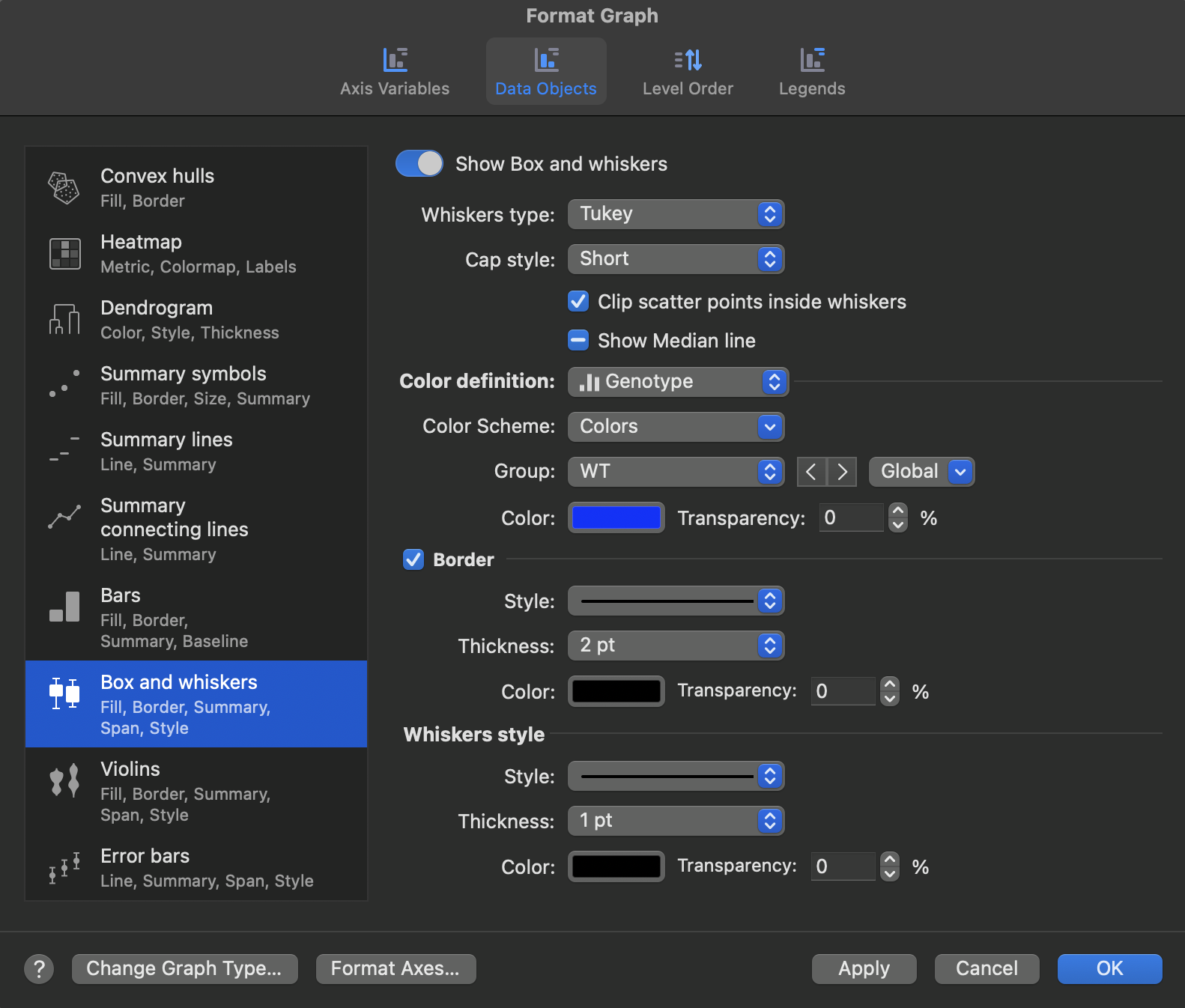
The Whiskers type option can be set independently for each group and determines how whisker endpoints are calculated:
•Tukey: whiskers extend to 1.5 times the interquartile range from the box edges, or to the outermost data point within that range if no data falls beyond it.
•Min/Max: whiskers extend to the minimum and maximum data values.
•Percentile: whiskers extend to a custom percentile range. Specify the percentile value, which sets whiskers at the corresponding lower and upper percentiles (e.g., 5th and 95th for a 90% range).
Whiskers style
Whiskers style options apply to the GDO as a whole:
•Cap style: controls the cap drawn across the end of each whisker. Options are None, Short, and Long.
•Stroke thickness: whisker line thickness in points.
•Stroke style: options are Solid, Dash, Dot, DashDot, and DashDotDot.
Median line
The Show median line option shows or hides a line inside the box at the median value. In the Format Graph dialog this option applies to the GDO as a whole. To show or hide the median line for one group only, select that group's box on the graph and use the Graph Inspector.
The same is true of the Width controls throughout the summary data objects: the Format Graph dialog sets them for the data object as a whole, while the Graph Inspector can set them for an individual group.
Box options
Width applies to the data object as a whole in this dialog, and can be set per group from the Graph Inspector:
•Width: controls the width of the box relative to the category lane, from 10% to 100%.
Border
Border options can be set independently for each group:
•Border visibility.
•Border stroke color.
•Border stroke thickness.
•Border stroke style: options are Solid, Dash, Dot, DashDot, and DashDotDot.
Color settings
Color settings apply to the GDO as a whole. Box fill color can be defined in two ways:
•Single color: all boxes use one fill color.
•Categorical variable: each level of the selected variable is assigned a color from the active color scheme. If a group in the axis variable corresponds to multiple levels of the color variable, it receives the color assigned to the "Undefined" level.
Note that gradient colormaps based on a continuous variable are not available for the box and whiskers GDO.
Interaction with scatter symbols
When the Scatter symbols GDO is also enabled on the graph, the Clip scatter points inside whiskers option hides individual scatter symbols that fall within the whisker range, avoiding visual overlap with the box and whiskers.